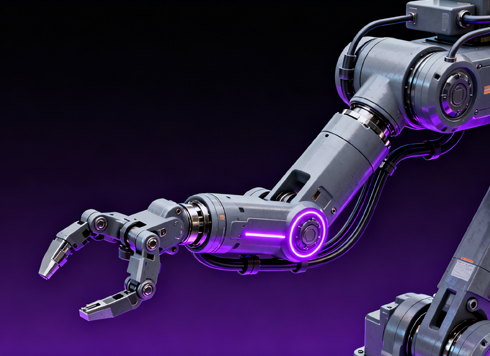
Booth animation was fine as a loop, but the client now wants to rotate the view and tap parts for explanations on site — will the original model hold up?
Conclusion: When a booth animation changes from looping playback to free rotation with hotspot explanations, most projects do not need the animation rebuilt from scratch, but it is not as light as adding a button either. Based on 2026 project delivery experience, for 30–60 seconds of content and 10–30 selectable parts, the schedule typically increases by about 40%–70%, and cost rises by about 30% to 100%; the bulk of the increase comes from model part separation, material instancing, lighting setup, and target-device performance — not from writing interaction code.
Why do adding rotation and hotspots affect the model and lighting?
In a playback-only version, viewers are passengers; the camera path decides what they see. In an interactive version, viewers are drivers; any angle can be dragged into view. Backs, undersides, and seams that a playback version can hide through camera movement are handed to the client as-is in an interactive version, and those areas are often simplified during modeling. The tech stack is different too: playback relies on Timeline or animation clips advancing linearly, while interaction relies on state machines, parameter drives, event callbacks, and UI panel links, and the model must be wired as selectable objects. From a delivery rhythm perspective, animation and camera work decrease, while model rework and performance tuning increase; the two do not replace each other one-for-one.
- The visible range has changed: Fixed camera shots only need optimization at on-camera angles; an interactive version must hold up at 360°, exposing broken faces, flipped normals, and texture stretching all at once.
- The logic layer has changed: It shifts from what second is playing to who was clicked, what state it is in, and how it resets. More states mean more test cases.
- The performance budget has changed: The interactive version must hold real-time frame rates; exhibition all-in-one machines commonly need 30–60 fps, mobile is tighter, and draw calls, baking, and post-processing all need recalculation.
In one sentence: The main cost of an interactive version is usually making the model and materials hold up from any angle, not writing interaction code.
First decide whether it is worth it: three on-site conditions
Not every project is suitable for upgrading from a playback version to an interactive version. The criterion is not whether the client wants it, but whether people on site will actually tap. In experience, where average visitor dwell time is under 30 seconds and a presenter guides the whole visit, interaction click rates are usually low, and spending on animation pacing and visuals is more worthwhile.
- Is anyone guiding on site: For unattended, self-guided booths, interaction has high value; for guided, one-way playback settings, most interaction goes unused.
- Minimum device performance: Exhibition all-in-one machines, industrial PCs, laptops, and tablets vary widely. Getting the actual model before discussing the plan saves far more than building first and adapting later.
- Will the content change: If copy, color schemes, and SKU order will be changed repeatedly later, externalizing content in an interactive version is more economical over time; if content is fixed once and for all, the extra investment in interaction has limited return.
The criterion can be very concrete: If the client can clearly say who will tap and what they want to see after tapping, it is worth doing; if they only say it should look more premium and be interactive, later in the project often no one taps at all.
On the delivery floor: once constraints are laid out, the plan has to change
In exhibition all-in-one projects, a common set of constraints looks like this: the budget was quoted for a playback-only version, the assets are only the client’s model file and a few product photos, the on-site all-in-one machine is an integrated-graphics model from several years ago, and the deadline is two weeks. The usual approach is to switch lighting to baking, unify materials into one parent material for instancing, reduce polygons by selectable part and create two LOD levels, and extract hotspot explanations into an external config table. The cost is 2–3 extra days for baking and a very tight schedule; the benefit is that the client can change copy later without repackaging.
But if real-time metal reflections are requested later, it often means going back to redo the baking and material layers, with rework close to rebuilding the material layer once. In the typical range, this kind of rework usually adds 3–8 working days, depending on the number of parts and reflection scope; that is why whether real-time reflections are necessary should be listed separately at the quoting stage.
How do the three delivery forms compare: pre-rendered video, real-time interaction, and a hybrid
When the client asks whether it can be interactive, what actually needs comparing is three forms, not two engines. Pure pre-rendered video wins on controllable visuals and short timelines; pure real-time interaction wins on configurable options and selectable parts; the hybrid form uses video for atmospheric shots and real-time for local inspection, and has become fairly common in medium-to-large exhibition projects in recent years.
- Pure pre-rendered video: A 30–60 second final piece, experience range 5–15 working days; a revision requires re-exporting image sequences, but visual quality is stable and it is not picky about on-site devices.
- Pure real-time interaction: The same content volume plus 10–20 working days, experience range 15–30 working days; it can change colors and configurations and supports hotspot taps, but requires target-device acceptance testing.
- Hybrid form: Adds a pre-rendered opening on top of the real-time version, typically adding 3–8 working days, suitable for scenarios that need both atmosphere and operation.
The selection basis should be ranked by three things: whether on-site devices are confirmed, whether later content changes often, and whether viewers need to operate it themselves. If all three lean yes, real-time interaction is more suitable; if any one is clearly not true, pre-rendered video usually has better value for money. Starting real-time interaction before device performance is confirmed is a common risk point in these projects.
Applicable and non-applicable boundaries
The cases suitable for an interactive version are fairly clear: touchscreens in showrooms, exhibitions, and stores; sales demos for letting customers choose configurations; and product displays whose content will keep updating later. In these scenarios, the value of interaction comes from each person seeing the part they want to see, not from flashier visuals.
The cases that are unsuitable or do not need interaction should be stated just as clearly: one-way playback exhibits with extremely short visitor dwell time, video content only for online advertising, projects where the on-site device model is not yet confirmed, and projects whose budget only covers basic model rework. Forcing interaction into these cases commonly results in frame rates that cannot be maintained, content no one taps, and higher maintenance costs later. Interaction is not a simple upgrade item; it is another product form with different preparation requirements.
Frequently asked questions
How much extra schedule does adding free rotation and hotspot taps usually take?
For 30–60 seconds of content and 10–30 selectable parts, the experience range is an increase of about 40%–70%, equivalent to 10–20 working days; model rework and target-device tuning often account for more than half.
Two quotes differ by 100% — where does the difference usually come from?
Mostly from different approaches to interactive-level model part separation, material instancing, lighting baking, and target-device acceptance; a scope that quotes only interaction code and not model rework is likely to add costs later.
Does the client receive project files or a runnable build?
If the client will change copy themselves, the common delivery is the project plus an external config table and packaging instructions; for on-site playback only, deliver an executable build and keep a project backup, depending on maintenance needs.
After launch, do copy changes and SKU changes still require repackaging?
Put copy, color schemes, and SKU order into external configuration (a spreadsheet or JSON), and replacing assets is enough; repackaging is usually unnecessary. Keep version number records and rollback backups.
If a project is about to add interaction to a playback version, it is advisable to first write the target device model and who will tap and what they want to see into the requirements, then have the vendor quote separately by model layer, material layer, and interaction layer. For exhibits where devices are undecided, content barely changes, and visitor dwell time is very short, putting money into animation pacing and visual quality is usually more worthwhile.
-
 EDC·Trendy Camera Product Design: Form Follows Emotion
EDC Toy Camera: Braun-inspired retro design ...
-
 Product Design of Children's "Bubble Rocket" Underwater Thruster
Inspired by "Octonauts + Space", kids' "Bub ...
-
 Design of Adaptive Intelligent High-Altitude Shuttle Transport Robot
Smart rural shuttle bot: Streamlined, weath ...
-
 "Effortless" Exoskeleton Wear: Unleash Ultimate Freedom in the Sea
"Unfelt Wearability" & "Bionic Power" redef ...
-
If product photos are shot at an angle and the client gives only one overall length, which dimension should be used first as the baseline in appearance modeling to avoid drift?
Date: Nov 23, 2026 Read: 4
-
UE5 textures blur and frames stutter late in the render while the client pushes for 4K: reduce textures first or turn off Lumen?
Date: Nov 22, 2026 Read: 15
-
Only Phone Selfies and One Voice Clip for AI Digital Human 3D Modeling, but It Needs Real-Time Live Streaming—Is Detailing the First Version for Close-Ups a Waste?
Date: Nov 21, 2026 Read: 22
-
Client says the daytime view outside the floor-to-ceiling window is washed out and the room is too dark to see the furniture—should we tone down the exterior or add interior lights first to reduce rework?
Date: Nov 20, 2026 Read: 25
-
The structural engineer sent a STEP assembly with parts named Part1 and Part3, and the client wants to change the main color halfway through the product demo animation—is it still possible to add part naming?
Date: Nov 19, 2026 Read: 36