





Proposal for Brand IP Virtual Human Modeling and Animation Production
I. Project Overview
1.1 Project Background
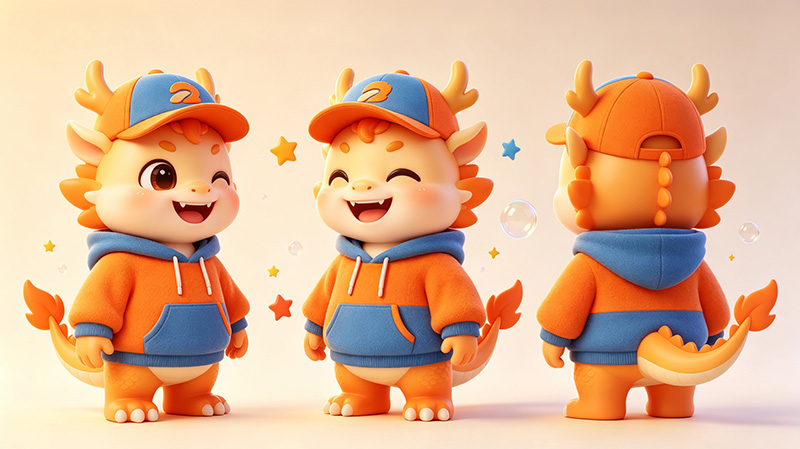
Against the wave of digital transformation, brand IP virtual digital humans have become a core carrier for corporate brand communication, intelligent interactive services and digital twin visualization. Adopting high-precision 3D modeling, skeleton rigging and motion animation technologies, combined with mainstream rendering engines including Unity and Three.js, we build brand-identifiable, interactive and iterable digital human avatars widely deployed in diverse scenarios such as digital twin large screens, promotional materials and AI intelligent customer service.
1.2 Project Objectives
-
Build exclusive high-precision 3D virtual human avatars supporting realistic, anime, cartoon and other art styles
-
Complete character skeleton rigging and skin weight optimization to deliver natural, smooth motion performance
-
Develop core motion animation library (scan, idle, dialogue, farewell) covering mainstream interaction scenarios
-
Enable seamless compatibility with Unity and Three.js engines for multi-platform deployment on digital twin large screens, Web terminals and mobile devices
-
Reserve AI semantic drive interfaces for subsequent intelligent upgrades (lip-sync, facial expression drive, voice linkage)
II. Overall Technical Architecture
2.1 Full Technical Roadmap
| Layer | Tech Stack | Description |
|---|---|---|
| Modeling & Rigging | Maya / Blender / C4D | High-poly polygon modeling, UV unwrapping, PBR material creation, skeleton system construction |
| Animation Production | Maya / MotionBuilder / Motion Capture | Basic motion production including idle & dialogue; retouch raw motion capture data |
| Real-time Rendering Engine | Unity 2022 LTS / Unreal Engine 5 / Three.js | Material & lighting adaptation, real-time rendering, animation state machine control |
| Frontend Interaction Framework | Vue3 / React + Three.js / WebGL | Lightweight Web deployment, integration with large-screen visualization |
| Digital Twin Platform | In-house Digital Twin System / ThingJS / CityEngine | Large-screen scene fusion, data-driven animation triggering |
| AI Capability Extension | IFlytek / Azure TTS / In-house NLP | Speech synthesis, semantic comprehension, lip drive (post iteration) |
2.2 Overall Implementation Workflow
III. 3D Character Modeling Scheme
3.1 Modeling Specification Standards
| Item | Spec Parameters |
|---|---|
| Topology | Quad-dominant mesh, denser edge loops at critical joints |
| Polygon Budget | Realistic style: 80k–150k tris; Cartoon style: 30k–50k tris; Mobile optimized version: ≤20k tris |
| UV Mapping | Multi-tile UV unwrap with even texel density, support for 4K/2K textures |
| Texture Channels | Albedo, Normal, Roughness, Metallic, AO, Emissive (PBR pipeline) |
| Facial Expression System | Support Blendshape with ≥52 base expression targets covering FACS system |
| Clothing & Accessories | Separate meshes, support secondary skeleton rigging for physical simulation (skirts, ribbons, etc.) |
3.2 Brand IP Avatar Design Implementation
-
Avatar Positioning: Confirm character style based on brand tonality (tech / friendly / professional / national trend); deliver ≥3 conceptual design drafts
-
Facial Features: Highlight brand memory points (signature hairstyle, accessories, makeup elements)
-
Color System: Align with brand VI specs; ratio of primary & secondary colors follows corporate visual identity system
-
Costume Design: Embed brand cultural symbols or industry-specific features
3.3 Modeling Technical Details
-
Base Mesh Construction: Build character base mesh via polygon modeling with clean topology; add subdivisions for face and joint regions
-
High-Detail Sculpting: ZBrush for high-poly sculpting (skin pores, fabric wrinkles, etc.)
-
Retopology: Retopologize high-poly assets to mid/low-poly meshes with sufficient edge loops for deform zones (joints, face)
-
PBR Material Production: Substance Painter multi-layer texture baking to restore physical surface properties
IV. Skeleton Rigging & Skinning Scheme
4.1 Skeleton System Architecture
| Skeleton System | Spec Description |
|---|---|
| Main Skeleton | Standard human rig (HIK/ADV) with ≥80 bone nodes |
| Facial Bones | Key expression drive bones (eyes, brows, nose, mouth, cheek); dual drive with Blendshape |
| Finger Bones | ≥15 bones per hand to support fine gesture animation |
| Secondary Bones | Physics bones for hair, skirts, ribbons, ornaments with physical simulation support |
| Bone Hierarchy | Max depth ≤25 layers to guarantee engine import compatibility |
4.2 Rigging Technical Workflow
-
Maya Advanced Skeleton / Blender Rigify: Auto-rig plugins to generate base skeleton and shorten production cycle
-
Skin Weight Optimization: Initial solve via Geodesic Voxel Binding + manual weight polish for natural joint deformation (focus on shoulder, elbow, knee, neck)
-
Flexor & Twist Deformers: Add corrective deformers at elbows & knees to fix volume loss during bending
-
Facial Rigging: Build ≥52 Blendshapes based on FACS covering common expressions & visemes
-
Seamless IK/FK Switch: IK/FK controllers equipped for limbs & neck for animator flexibility
-
Global & Sub Drive Controls: Hierarchical controller architecture with master transform control + regional sub-controllers
4.3 Rigging Acceptance Standards
-
Joint rotation limits conform to human physiology (large joints like shoulder & hip allow moderate over-extend)
-
Skin deformation pass test: No mesh interpenetration, collapse or jagged distortion under extreme poses
-
Natural facial expressions without warping; no conflicts between combined Blendshapes
-
Complete skeleton & skin data retention after import to Unity/Three.js
V. Motion Animation Production Scheme
5.1 Motion Animation List
Four core base motions to be delivered, each with loop version & single-play version:
| Motion Name | Motion Description | Duration Req | Loop Type | Application Scenario |
|---|---|---|---|---|
| Scan / Patrol | Natural left-right head gaze, slight torso rotation, focused search gaze with subtle chest breathing | 4–6s | Loopable | Initial state on digital twin large screen; idle auto "data observing" pose without user interaction |
| Idle | Neutral standing with tiny weight shift, steady breathing, forward gaze, occasional blink & micro-expression | Infinite Loop | Perfect Loop | Default state across all scenes, waiting for user wake-up or command input |
| Dialogue | Natural hand gestures (open palm, pointing, chest gesture), slight head tilt, rich expressions, eye contact with user | 6–10s | Single Play (loopable via seamless stitch) | AI Q&A, presentation, customer service interaction |
| Farewell / End | Waving goodbye paired with smile & nod; optional turn or slight bow etiquette | 3–4s | Single Play | Interaction end, user exit, presentation completion trigger |
5.2 Motion Production Technical Workflow
Method 1: Keyframe Hand Animation (Core Workflow)
-
Animation Storyboard: Draft key pose sketches for each motion to define start, critical poses, end silhouette & motion arcs
-
Blocking: Lay primary pose keyframes on timeline to lock timing & silhouette appeal
-
Breakdown: Insert in-between frames, refine motion arcs, add ease-in & ease-out curves
-
Polish: Refine hand & facial micro-expressions, breathing rhythm, secondary motion (cloth, hair follow-through)
-
Animation Curve Tuning: Adjust Animation Curve for elastic, organic movement
Method 2: Motion Capture Assistance (Optional, subject to budget)
-
Optical / inertial mocap system to capture raw base motion data
-
Clean raw mocap data & retarget to target skeleton
-
Manual keyframe polish on mocap base to boost expressiveness & stylization
5.3 Motion Style Standards
-
Motion tempo aligned with brand tonality: Tech brands adopt snappy precise movement; fashion brands smooth elegant flow; national trend brands stretch restrained postures
-
Motion physics follow Disney animation principles: Anticipation, follow-through & overlap, ease-in/ease-out, arc motion
-
Hand gestures pre-confirmed by client to avoid cultural taboos or ambiguous signs
-
Consistent emotional tone between facial expressions & body language (e.g. synchronized smile & gesturing during dialogue)
5.4 Delivered Motion File Formats
| Format | Description |
|---|---|
| FBX (with embedded animation) | Universal format compatible with Unity & Three.js import |
| GLB/GLTF | Lightweight Web-native format directly usable in Three.js |
| Raw Animation Curve Source Files | Maya .ma / .mb or Blender .blend project source files |
| Animation State Machine Config | Unity Animator Controller / Three.js animation blend config script |
VI. Engine Integration & Digital Twin Large Screen Application
6.1 Unity Integration Scheme
-
Asset Import Spec: FBX import settings (scale factor, animation compression, Humanoid Rig config)
-
Material & Lighting Adaptation: Convert PBR materials for URP/HDRP pipelines, calibrate lighting for large-screen environments
-
Animation State Machine (Animator):
-
Construct state machine with idle (loop) as default state
-
Configure state transition logic: Scan → Idle → Dialogue → Farewell
-
Animation Blend Tree for smooth cross-fade (transition time: 0.2–0.5s)
-
Control parameters: isSpeaking (bool), waveTrigger (Trigger), lookAroundTrigger (Trigger)
-
-
Interaction Logic Scripts:
-
Data-driven motion trigger (e.g. scan motion activated on screen data alert; dialogue motion triggered by user click)
-
UGUI/TextMeshPro integration for linked dialogue bubbles & subtitles
-
-
Performance Optimization:
-
LOD setup for auto low-poly switching at long camera distance
-
Animation LOD to reduce update frequency for distant avatars
-
Texture compression (ASTC/ETC2) for mobile compatibility
-
6.2 Three.js Integration Scheme
-
Model Loading:
-
GLTFLoader for GLB/GLTF assets with Draco compression decompression
-
Parsing self-contained AnimationClip embedded in model files
-
-
Animation System:
-
Multi-animation management via AnimationMixer
-
Smooth motion switching via Action.crossFadeFrom()
-
Clip segmentation via AnimationUtils.subclip for custom motion segments
-
-
Interaction Control:
-
Mouse hover/click detection based on Raycaster
-
Dialogue motion trigger via voice input button
-
Scan motion trigger on page load completion / data refresh events
-
-
Digital Twin Large Screen Scene Fusion:
-
Avatar placed at bottom-left / bottom-right / central zone with semi-transparent background blending
-
Background blur & tech HUD frame overlay via CSS or texture layers
-
Data chart linkage: Avatar plays scan/dialogue motion synchronously on chart data fluctuation
-
-
Web Performance Optimization Tactics:
-
Basis Universal texture compression to cut VRAM consumption
-
GPUInstancing to lower Draw Call count
-
Optimize mesh polycount under 20k–30k tris for smooth mobile rendering
-
Three.js LOD module for distance-based mesh precision switching
-
WebGL 2.0 activation, Transform Feedback for pre-processed animation data
-
6.3 Dedicated Digital Twin Large Screen Integration Plan
-
Data Linkage Mechanism:
-
Standard event interface definition: onDataUpdate, onAlertTrigger, onUserSpeak, onSessionEnd, etc.
-
Event-driven motion switching replacing traditional UI button triggers
-
WebSocket persistent connection for real-time backend data push & avatar feedback drive
-
-
Large Screen Layout Adaptation:
-
Responsive design supporting resolutions from 1920×1080 to 7680×2160
-
Independent render layer for avatar stacked above chart layers to guarantee render order
-
Transparent background output for overlay compatibility with all screen templates
-
-
Render Performance Benchmark:
-
Stable 60fps rendering on large screens (GPU ≥ RTX 3060)
-
30fps steady on mobile Web / 60fps steady on desktop Web
-
Total memory footprint controlled within 1.5GB (texture assets included)
-
VII. IP Avatar Modeling Application for Promotional Materials
7.1 Static Frame Render Output
-
Dedicated lighting rig built in Maya/Blender based on high-poly assets (3-point lighting + ambient light + rim backlight)
-
4K/8K promotional still rendering via Arnold / V-Ray / Cycles renderer
-
≥5 character poses & 3 scene/background portrait sets delivered
-
PNG sequence with alpha channel for post compositing
7.2 Dynamic Promotional Video Production
-
Render 1080p/4K promotional videos by combining motion animations with scene environments
-
Integrate brand Slogan animation & product showcase for complete brand clips
-
Green screen / transparent background versions supplied for post-editing compositing
7.3 Multi-Format Asset Derivation
-
2D flat IP graphic asset package (AI vector format) derived from finished 3D model
-
Standard orthographic views (front, side, back) + ≥16 common expression emojis
-
Full FBX source files provided for partner secondary development (AR filters, H5 interaction, etc.)
VIII. Intelligent AI Upgrade Reserve for 3D Digital Human Modeling
8.1 Reserved Semantic Drive Interfaces
-
Standardized Blendshape naming convention aligned with mainstream lip-drive algorithms (Microsoft Mixed Reality / Audio2Face)
-
Reserved audio input channel to parse real-time voice stream into viseme drive parameters
-
Standard JSON API for third-party NLP system to trigger motion commands (e.g. {"action":"dialogue","emotion":"happy","text":"Hello"})
8.2 Expression & Emotion System
-
Base emotion mapping built on FACS framework (joy, solemnity, surprise, thinking, approval, etc.)
-
Smooth emotion gradient interpolation via parameter blending (e.g. neutral → happy seamless transition)
-
Reserved port for AI sentiment recognition to auto-match avatar emotional state from user semantics in future iterations
IX. Project Milestones & Delivery Schedule
| Phase | Work Content | Deliverables |
|---|---|---|
| Phase 1: Concept Design | Brand avatar positioning, concept sketching, style sign-off | 3 sets of conceptual drafts, style reference mood board |
| Phase 2: High-Poly Modeling | High-poly asset modeling, sculpting, retopology | High-poly source files (ZBrush/Blender), low-poly mesh files |
| Phase 3: Material & Texturing | UV unwrapping, PBR texture baking & painting | Substance Painter texture source files, material ball presets |
| Phase 4: Skeleton Rigging | Skeleton setup, skin weight tuning, Blendshape production | Fully rigged character file, weight deformation test report |
| Phase 5: Motion Animation | Production & review of four core motions | FBX animation assets, animation demo review video |
| Phase 6: Engine Integration | Unity/Three.js adaptation, interaction logic coding | Executable demo build, integration technical docs |
| Phase 7: Testing & Final Delivery | Cross-platform compatibility testing, performance optimization, final asset handover | Full delivery asset package, complete technical documentation |
X. Quality Control & Acceptance Criteria
-
Model Precision: Accurate mesh structure, clean topology, stretch-free UVs, seamless texture stitching
-
Rigging Quality: Natural skin deformation without abnormal warping; lifelike facial expressions; intact data after engine import
-
Animation Quality: Smooth, brand-aligned motion rhythm, seamless loop cycles, soft cross-fade transitions
-
Engine Performance: FPS meets cross-platform benchmark, high lighting reproduction accuracy, interaction response latency ≤200ms
-
Delivery Completeness: Full source assets, engine project packages, technical specs, user operation manuals fully supplied
XI. Risk Mitigation Measures
| Risk Item | Mitigation Strategy |
|---|---|
| Excessive mesh polycount causing Web-side performance bottlenecks | Implement LOD system; deploy optimized low-poly variant for mobile; adopt texture compression & Draco mesh compression |
| Motion style deviation from brand expectation | Stage-gated review checkpoints (Blocking phase submission for pre-approval) to confirm pose style in advance |
| Cross-engine compatibility defects | Adopt industry-standard pipeline during modeling & rigging; conduct multi-engine import validation on export |
| Project schedule delay | Parallelize modeling, rigging & scene asset development; reserve 10% buffer lead time |
| Incompatible reserved AI extension interfaces for future integration | Preliminary research on mainstream lip-sync algorithm standards; name Blendshapes following universal industry specs |
XII. After-Sales Service & Long-Term Technical Support
-
Warranty Period: 3 months free bug & model defect repair post-delivery for issues caused by our development
-
Animation Library Expansion: Quotation sheet provided for additional motion asset production (walk, run, clap, bow, etc.)
-
Engine Version Upgrade Support: Assist asset migration adaptation for client engine version upgrades (fee negotiated based on workload)
-
Technical Training: 2 remote/on-site training sessions covering model import, animation state machine setup & interactive development
-
Document Delivery: Full technical documentation package (modeling specs, rigging handbook, animation state machine config guide, API interface specs)
